Position copier
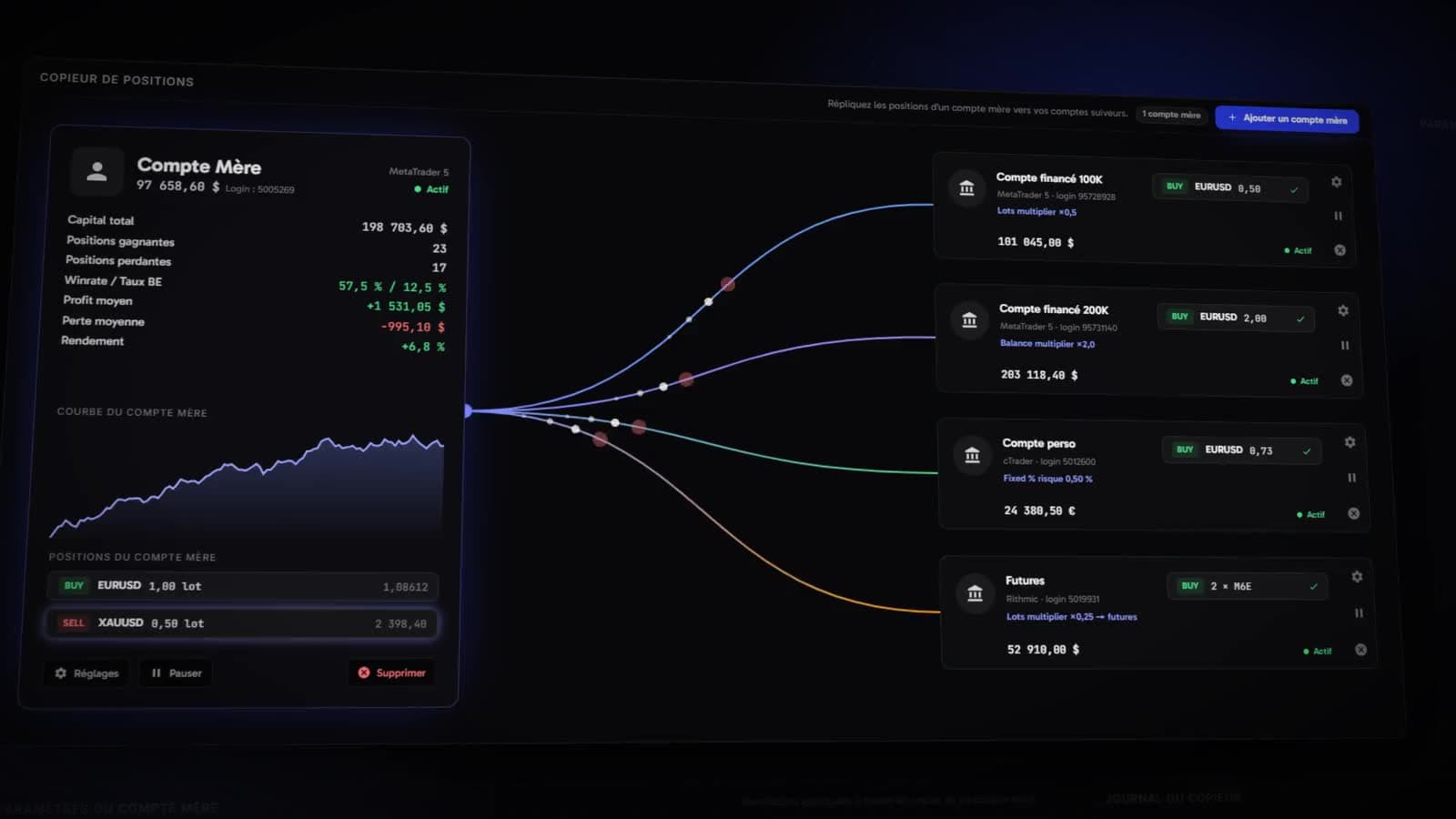
Replicate a master account's positions onto your follower accounts, with a size of their own for each, prop-firm protections and limits that stop copying at the right moment.
5 min read · Version 1.2.51 · updated 29 September 2026
- Set up a master account and its followers
- Choose how each follower sizes its positions
- Set up prop-firm protections and discipline limits
- Check every copier decision in its log
The principle
You trade a master account. Your follower accounts reproduce its positions, each with its own size and its own limits. The copier replicates your own orders between your own accounts: it never copies another trader's positions.
- Plans: Copier or Complete, and the free trial.
- Accounts: MetaTrader linked with the master password, cTrader or Rithmic, as master or follower. Crypto accounts are not copied.
- Mixing platforms: the master and its followers do not have to be on the same platform; a MetaTrader master can, for instance, feed a Rithmic follower.
Set up copying
- 1
Terminal>Copy Trader. - 2
Add a master account, then choose the account you trade. - 3Open the master account's
Settings: its protections apply to all its copies. - 4
Add a follower, then choose one or several accounts. - 5Set up each follower, then
Save my settings.
An account that is already a master or a follower no longer appears in the choices: an account has only one role in the copier.
Set up a follower
The follower's Copy settings say how this account reproduces the master's positions. They are split into three tabs: Risk, Prop firm and Discipline.
- Risk type
Fixed lots: always the same size.Balance multiplier: size proportional to the follower's balance.Lots multiplier: the master's lots multiplied by a coefficient.Fixed % risk: a percentage of the follower's balance, computed from the stop.- Copy Stop Loss, Copy Take Profit
- Whether to reuse the master's stop and target.
- Copy Pending Orders
- Also reproduce pending orders.
- Maximum lots
- A size cap. A position above it is opened at the maximum minus 0.1 lot.
- Hedging Restricted
- Forbids opposite positions on the same symbol, for prop firms that refuse hedging.
- Restriction window
- A window during which the follower opens and closes no position.
- Max Loss Daily
- Stops copying 0.1% before the maximum daily loss allowed.
Trailingmakes it follow the balance.
Psychology Management
- Max Loss
- A maximum loss, as a percentage or a number of losing trades, per session, day or week.
- Max Profit
- A maximum gain, on the same principle: a day that is made stops.
- Max Risk Per Trade
- The highest risk accepted for a copied position.
- Strategy
None, orMartingale: an initial risk adjusted after each loss or each gain, and reset after a streak.- E.Restriction Management
- What the follower does with a position left open during a restriction:
Do Nothing,Ignore if SL,Ignore if TP, orTake After Restrictionto take it once the restriction lifts. - Priority in Risk Restriction
- Which rule wins when several limits overlap.
Protect the master account
The master account's settings apply to all its copies.
- Risk Management
- Any master position opened without a stop or a target gets both: the stop at the chosen risk (as a percentage of balance), the target at the chosen reward-to-risk ratio.
- Propfirms Protection
- Turns on the protections below, as you choose:
Only Eco.News,Profit Target & Daily Loss, orEverything. - Eco.News Restriction
- Closes your positions on the master a chosen number of minutes before and after each high-impact economic release. Followers keep theirs during the window, then follow the master again.
- Profit.T / Daily.L
- Closes your positions when the profit target is reached, or 0.1% before the maximum daily loss.
- Min. Trad.Day Farmer
- On days without any trade, opens a 0.01-lot position at 21:30 UTC and closes it after the chosen delay: enough to count a trading day for firms that require a minimum.
- Take restricted positions
- Replicates on the followers, anyway, the positions blocked by these restrictions.
Pause, replace, disconnect
- Pausing the master account pauses all its active followers.
Startresumes them. - Pausing a follower stops it alone, without touching the others.
- Changing the master account: either delete everything (settings of the master and of its followers), or replace it with another account and keep all settings. The followers then move to the new master. As a safety check, Kara asks you to type the master's login again.
- Disconnecting a follower erases its settings and stops copying to that account.
Check with the copier log
A follower's Copier log writes, line by line, what the engine sent to that account: symbol, side, lot, price, and the rules that applied. When nothing went out, it says why: an empty list because the master has no more positions, or a copier stopped by a limit.
To be warned when an outage blocks copying (changed password, insufficient margin, stopped terminal), turn on the Copier and accounts topic in your notifications.